
Schritt 1: Tensorflow mittels virtualenv installieren
Schritt 2: Jupyter installieren
Dann Jupyter über virtualenv starten
#tensorflow virtualenv starten
source ~/tensorflow/bin/activate

#jupyter notebook starten
jupyter notebook
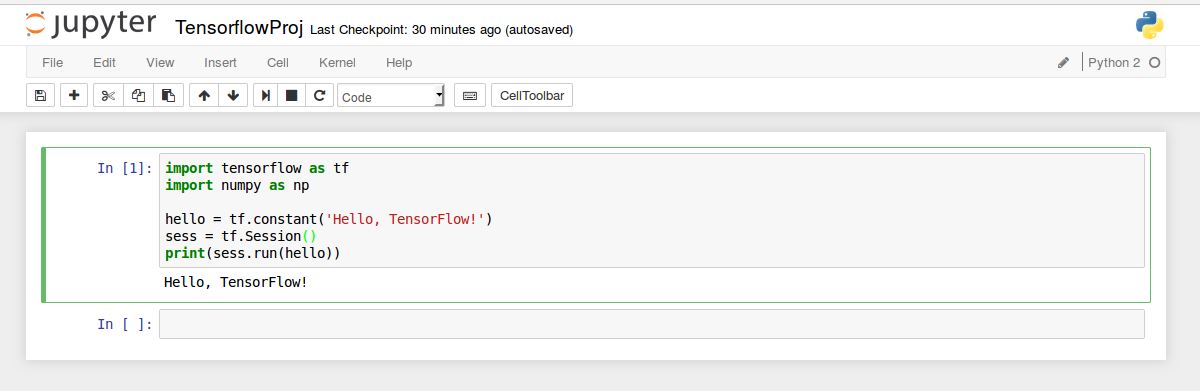
Neues Notebook erstellen mit Tensorflow Hello World
import tensorflow as tf
import numpy as np

hello = tf.constant('Hello, TensorFlow!')
sess = tf.Session()
print(sess.run(hello))
Zeile mit Shift+Enter ausführen
Mit Tab Autovervollständigen/Autocomplete
Intellisense Methoden Informationen zur Methode und den Parametern mit Shift+Tab:

Als nächsten logischen Schritt kann man sich ein paar examples ansehen. Aymeric Damien hat einige Examples inklusive Jupyter Notebooks auf Github gestellt.
#tensorflow virtualenv starten
source ~/tensorflow/bin/activate

#install git (if not already)
sudo apt-get install git-all

#get examples from github
git clone https://github.com/aymericdamien/TensorFlow-Examples.git

#run jupyter at this location
jupyter notebook

#now navigate to TensorFlow-Examples/notebooks
Schreibe einen Kommentar